SleepHQ vs ResMed myAir
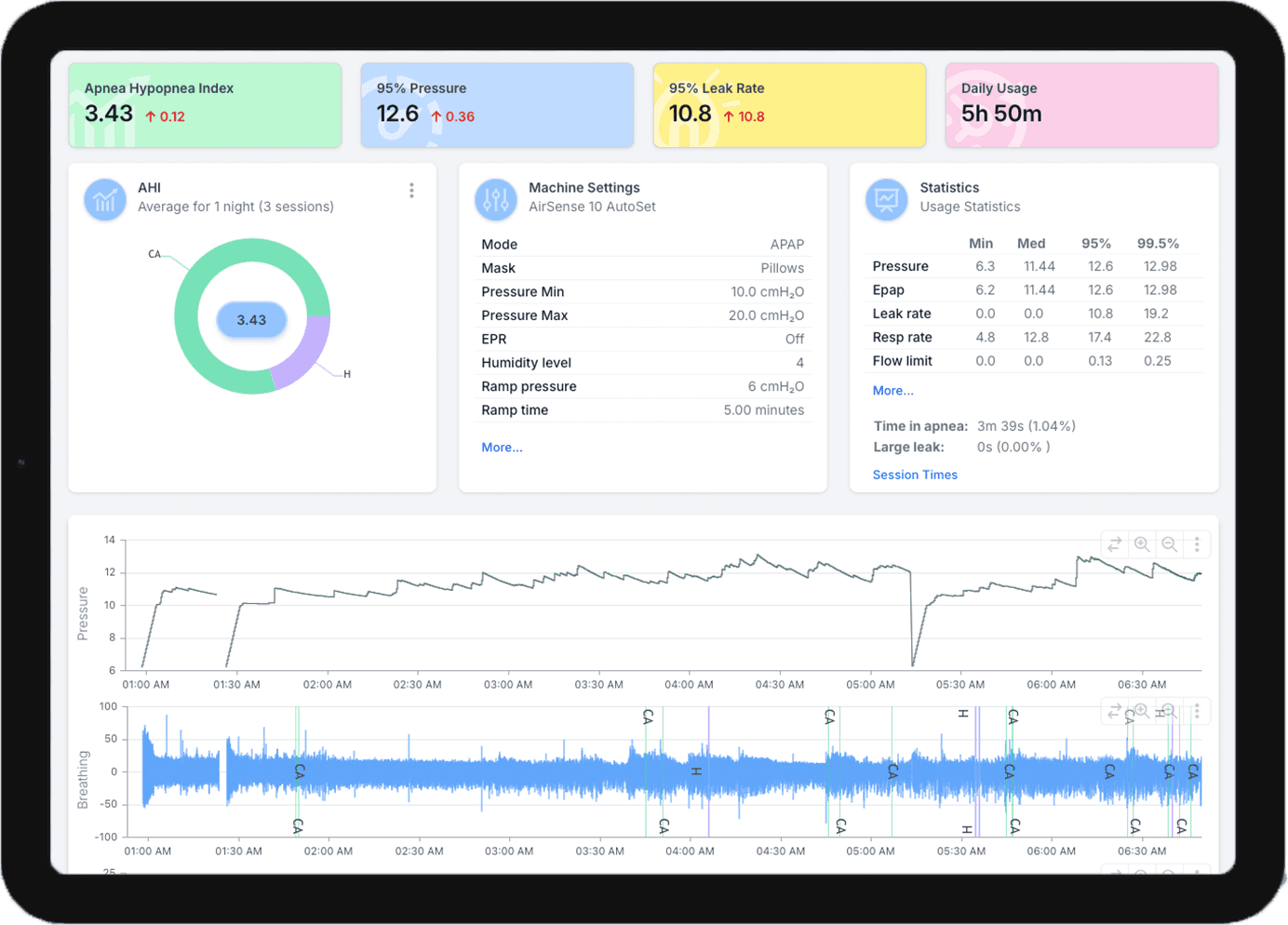
SleepHQ is the better choice if you want to see what happened during the night, not just how it scored. myAir is ResMed’s free app: it turns each night into a score out of 100 with four numbers behind it, and it works only with ResMed AirSense and AirCurve machines. SleepHQ charts every night breath by breath with event flags, reads machines from five manufacturers, and lets your doctor open the same detail from a share link.
Last updated
SleepHQ vs ResMed myAir at a glance
| SleepHQ | ResMed myAir |
|---|---|
| Price | |
| Free Basic plan with your most recent 30 days and one machine. Pro is a paid membership with unlimited data. | Free. |
| Machines it reads | |
| ResMed, Philips Respironics, Fisher & Paykel, Löwenstein and BMC. | ResMed AirSense and AirCurve only. Not ResMed S9 machines, and no other brand. |
| What you see each night | |
| Usage hours, AHI, pressure, leak rate and respiratory rate, with breath-by-breath charts and event flags underneath. | A score out of 100, with usage hours, mask seal, events per hour and mask on/off behind it. |
| Getting each night in | |
| Upload your SD card from any browser, or let a Magic Uploader Xtreme send it over wifi. | Your machine sends it over its built-in mobile connection, where there is reception. |
| Sharing with your doctor | |
| Connect to your clinic’s SleepHQ account, or email a share link that opens your full data. | Download summary reports to keep or share. |
| Help and coaching | |
| SleepHQ support, plus the SleepHQ Academy and Community with Pro. | Tips, videos and coaching messages, and an AI assistant called Dawn. |
Is myAir or SleepHQ better?
It depends on what you want from your morning check. myAir tells you quickly, and for free, whether you used your machine and how well your mask sealed. SleepHQ shows you what happened through the night, breath by breath, on any machine it supports.
The myAir score is built mostly from how long you wore your mask. ResMed’s own explanation of the score gives up to 70 of the 100 points for hours of use and up to 20 for mask seal, while a night with minimal breathing events earns 4 to 5 points. That makes it a good nudge to keep using your machine, and a poor guide to whether your breathing was under control, which is why a night can score well with an AHI worth asking your doctor about. Our look at the myAir score goes through an example.
myAir does some things well. It costs nothing, it needs no SD card, and on an AirSense 11 it walks you through setting up your machine. If a score and a streak are all you want, it will serve you well. If you want to understand your nights, or show them to someone who can help, that is what SleepHQ is built for.
What does SleepHQ show beyond a score?
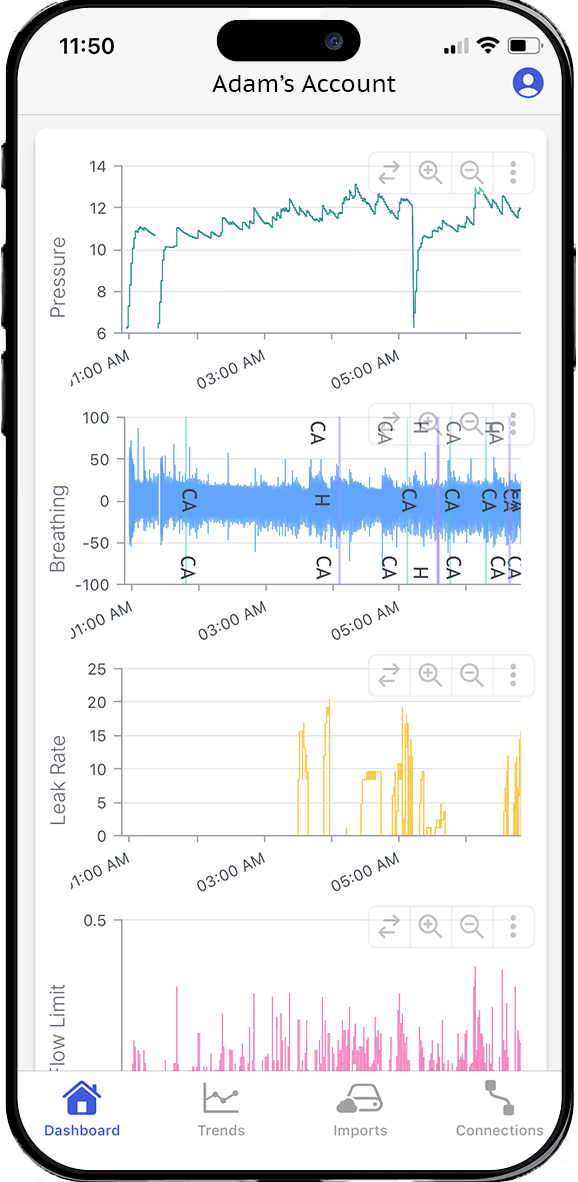
Every night in full. SleepHQ shows usage hours, AHI, pressure, leak rate and respiratory rate for each night, plus flow limitation on machines that record it, with the detailed charts underneath and event flags on them.
That means you can see when in the night something happened, rather than a single number for the whole of it: a cluster of events in the early hours, or a leak that started at three in the morning. SleepHQ shows you your data; it does not recommend therapy settings, and any change to them is one for your doctor or sleep specialist.
Does SleepHQ work with machines other than ResMed?
Yes. SleepHQ reads machines from ResMed, Philips Respironics, Fisher & Paykel, Löwenstein and BMC, and the supported devices page lists every model.
ResMed says myAir works only with its AirSense and AirCurve machines, not with its older S9 machines or with any other manufacturer’s.
How does each night get into SleepHQ?
Automatically, if you want it to. A Magic Uploader Xtreme goes in your machine’s SD card slot, holds your SD card, and sends each night to SleepHQ over your home wifi. It works with ResMed, Philips Respironics, Löwenstein and BMC machines, and with any SleepHQ account, free or Pro.
Without one, you copy the files off your SD card and upload them to SleepHQ from any browser, on a computer or on a phone with a card reader. myAir needs neither: a ResMed machine with a built-in mobile connection sends each night on its own, as long as there is reception.
Can I add my oxygen levels?
Yes. Pair a SleepHQ O2 Ring Pro with a Magic Uploader Xtreme and your overnight oxygen and pulse readings land on the same dashboard as your CPAP data, lined up night by night.
How do I share my nights with my doctor?
In two ways. If your doctor or sleep specialist has a SleepHQ clinical account, they can give you a link to connect your account to theirs. If they do not, you can create a share link and email it to them, and they can open your full high resolution data with one click.
Either way, they see the same detail you do. ResMed’s myAir lets you download summary reports to keep or share with your doctor.
Is SleepHQ free like myAir?
SleepHQ has a free Basic plan, and it reads the same files a paid one does. It covers one CPAP or O2 device and your most recent 30 days of data, with breath-by-breath analysis and share links.
A Pro membership adds unlimited data, so every night you upload stays in your account, plus unlimited devices and account members, Apple and Google Health sync, the SleepHQ Academy and the SleepHQ Community. It starts with a 14 day free trial. See the plans and prices.
Questions about SleepHQ and ResMed myAir
Can I use myAir and SleepHQ at the same time?
Yes. myAir gets each night from your machine over its built-in connection, and SleepHQ reads the files your machine writes to its SD card, so one does not get in the way of the other.
A Magic Uploader Xtreme does not change that either: myAir, DreamMapper and your machine’s own modem keep working with one in place. Keep myAir for the quick morning check, and open SleepHQ when you want to see why a night went the way it did.
Do I need a ResMed machine to use SleepHQ?
No. SleepHQ reads machines from ResMed, Philips Respironics, Fisher & Paykel, Löwenstein and BMC, and the supported devices page lists every model.
With a Pro membership, which covers unlimited devices, nights from more than one machine sit in one account, so changing brands does not mean starting your history again.
Does SleepHQ need my machine to have a mobile connection?
No. SleepHQ reads your machine’s SD card, so it does not depend on your machine sending its data to ResMed, or on mobile reception where you sleep.
Join for free today
Create a free SleepHQ account and start your journey today
Ready to improve your CPAP therapy results? Create a free account and get started today.